Designers and engineers worldwide trust DraftSight for first-class 2D design.
Are you a design and drafting professional looking for a powerful, intuitive, and affordable 2D CAD tool?
Look no further, DraftSight, from the creators of SOLIDWORKS, is a trusted choice for designers and engineers worldwide, offering a first-class 2D CAD solution.
What is DraftSight and what is it used for?
Are you a design and drafting professional looking for a powerful, intuitive, and affordable 2D CAD tool?
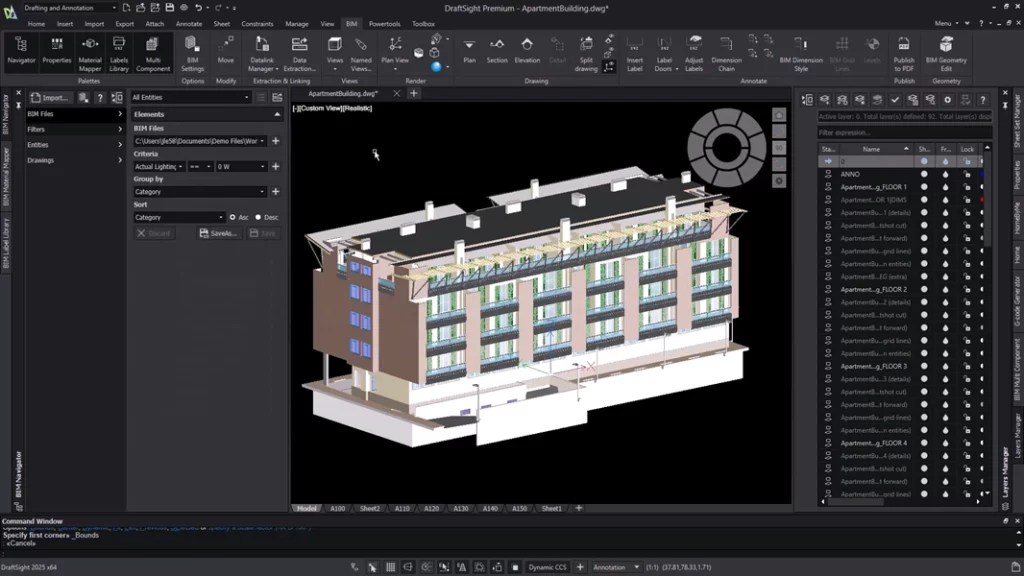
DraftSight Premium combines professional 2D drafting and 3D modeling in an intuitive and cost-effective solution.
Designed for architects, engineers, manufacturers, and designers, it streamlines workflows, improves collaboration, and ensures accuracy. With innovative tools, automation, and compatibility with other CAD systems, DraftSight Premium is a high-performance CAD software that’s also affordable. Increase your design efficiency with DraftSight Premium’s powerful tools:
Custom Blocks – Create dynamic and parametric blocks to simplify repetitive tasks. STEP Import – Add 3D models to 2D drawings for seamless collaboration. Sheet Set Manager – Easily organize and publish drawing sheets. DGN Export – Share DWG files in DGN format with complete control. BIM Module – Import and document BIM models directly into your drawings.
DraftSight Mechanical builds upon DraftSight Premium with advanced features for mechanical design. It supports the creation and editing of mechanical drawings, bill of materials management, and includes a robust materials library for standard mechanical components.
DraftSight Enterprise is a professional 2D CAD solution for large organizations. It offers advanced drawing features, full DWG file compatibility, and network deployment and support tailored to complex IT environments.
DraftSight Professional offers advanced productivity tools, API access for automation, and seamless integration with other CAD tools. Ideal for creating, viewing, editing, and converting DWG, DXF, and DGN files.
Not sure which DraftSight edition best suits your needs? The DraftSight product matrix provides a clear comparison of features across all editions—Professional, Premium, and Mechanical. Whether you’re interested in 2D drafting, advanced productivity tools, or mechanical design, the matrix helps you identify the best solution for your workflow.
Reasons to choose DraftSight 2D CAD design software
The best 2D CAD solution
Proven reliability : For over a decade, thousands of designers have trusted DraftSight for its robust desktop 2D CAD capabilities. Comprehensive tools : DraftSight provides all the productivity tools, features, and file compatibility needed to quickly and efficiently create, edit, view, and annotate any DWG file. Flexibility : With network licensing and extensive support, DraftSight offers greater capabilities and flexibility compared to other CAD products.
Maximize investment and increase return on investment
Cost-Effective : DraftSight helps free up IT budgets, enabling the purchase of more 2D seats with lighter hardware requirements or network licenses. High ROI : Increase return on investment without sacrificing quality or productivity, making it a smart choice for expanding team access to CAD.
Ease of use
User-friendly interface : DraftSight’s familiar user interface and common commands allow teams to get up and running in hours, not days. Seamless transition : Existing dynamic blocks, customizations, keyboard shortcuts, LISP routines, and script files work seamlessly with DraftSight, minimizing downtime and maintaining productivity.
Seamless compatibility and integration
Integration with multiple CAD systems : DraftSight integrates seamlessly with SOLIDWORKS and other CAD systems, improving the overall design workflow.
Increased productivity : Broad compatibility ensures a smooth and efficient design process, allowing users to work more easily in their preferred environments.
Compatibility with other CAD systems is a key element of productivity.





 The best 2D CAD solution